UI 버튼을 3개 만들어서 반복문을 통해 연결해 주었다
using System.Collections;
using System.Collections.Generic;
using UnityEngine;
using UnityEngine.UI;

public class ButtonsSceneMain : MonoBehaviour
{
    public UIButtons uiButtons;

    void Start()
    {
        this.uiButtons.onClick = (btnType) => {

            Debug.Log(btnType);
        };
    }
}
using System.Collections;
using System.Collections.Generic;
using UnityEngine;
using UnityEngine.UI;
public class UIButtons : MonoBehaviour
{
public enum eBtnTypes
{
Blue,Green,Yellow
}
public Button[] arrBtns;
public System.Action<eBtnTypes> onClick;
private void Start()
{
for (int i = 0; i < arrBtns.Length; i++) {
this.arrBtns[i].onClick.AddListener(() => {
this.onClick((eBtnTypes)i);
});
}
}
}그런데 클릭한 버튼에 해당하는 enum 값이 아니고 3이 출력되었다
원인을 찾고자 arrBtns의 길이를 하나씩 줄이며 살펴보았다
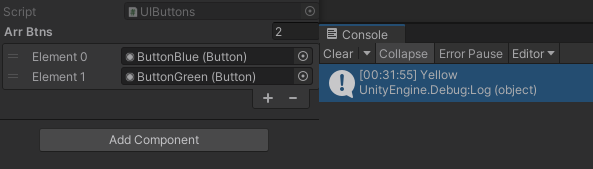
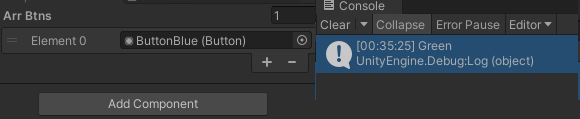
길이가 2일 때는 Yellow가 나오고 1일 때는 Blue가 나오는 것을 봤을 때
for문이 다 돌아간 후 i의 값을 출력하는 것 같다고 생각했다
그래서 원하는 대로 출력하려면 중간 값들을 저장해서 전달해야 될 것 같다
수정한 코드
using System.Collections;
using System.Collections.Generic;
using UnityEngine;
using UnityEngine.UI;

public class UIButtons : MonoBehaviour
{
    public enum eBtnTypes
    {
        Blue,Green,Yellow
    }
    public Button[] arrBtns;
    public System.Action<eBtnTypes> onClick;
    private void Start()
    {
        for (int i = 0; i < arrBtns.Length; i++) {
            int num =i; //중간 값 저장하기 위해 추가된 부분
            this.arrBtns[i].onClick.AddListener(() => {
                this.onClick((eBtnTypes)num);
            });
        }
    }
}
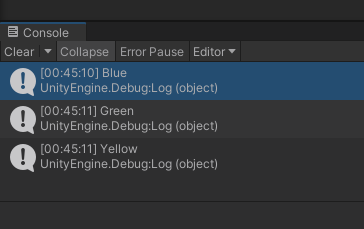
결과
'Unity > UI' 카테고리의 다른 글
| 상점 동적 스크롤뷰/데이터 연동/Tab 메뉴 구현 (0) | 2023.02.19 |
|---|---|
| 좌우로 넘기는 동적 스크롤뷰 만들기 (0) | 2023.02.13 |
| 좌우로 넘기는 정적 스크롤뷰 만들기 (0) | 2023.02.13 |
| 슬라이더 만들기 (0) | 2023.02.11 |
| 체크박스 만들기 (0) | 2023.02.07 |